


A small business rarely struggles with ideas—it usually struggles with time. New products need introducing, seasonal offers need promoting, and social media channels expect fresh content every week. Yet filming, editing, and revising a marketing video can easily take several hours or even days, making it difficult for small teams to keep up.
An AI marketing video generator shortens that process by turning existing product materials into finished marketing videos. Instead of arranging every scene manually, businesses can work from assets they already have, such as product photos, short clips, or a product page, then refine the generated result before publishing. This makes video marketing far more realistic for companies without an in-house production team.
Why Small Businesses Need Marketing Video Generators
Video has become a standard part of small business marketing. Whether launching a new product, promoting a seasonal offer, or keeping social media active, businesses are expected to publish fresh video content on a regular basis. The challenge is that producing every video manually can quickly become too time-consuming for a small team.
This is where an AI marketing video generator becomes useful. Instead of starting each project from scratch, businesses can reuse existing product photos, short video clips, or product pages to create marketing videos much more efficiently. The time saved can then be spent improving campaign ideas or testing different messages instead of editing timelines.
Tools such as AI Marketing Video Generator from Pollo AI are designed around this workflow. Rather than requiring professional video production skills, they help businesses turn existing marketing assets into videos that are ready to customize and publish across different channels. For small businesses that need to create content regularly, this offers a more practical way to keep marketing moving without significantly increasing the workload.
What is Pollo AI Marketing Video Generator and Why Choose It?
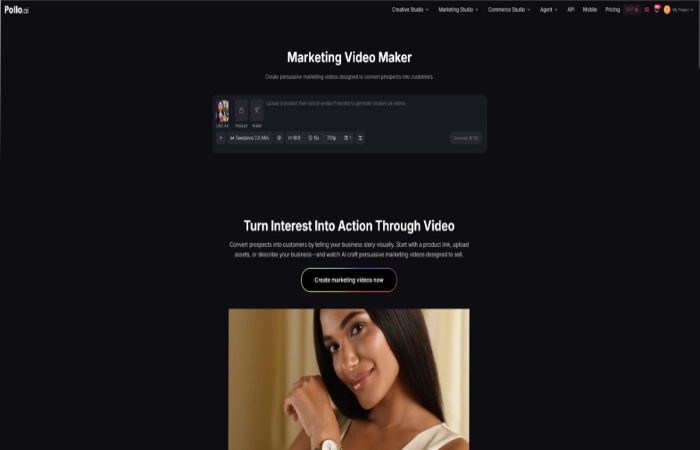
Pollo AI Marketing Video Generator is a web-based tool designed to create promotional videos from materials a business already owns. According to the official product information, users can start with a product URL, upload images or videos, or simply provide a written description. The platform then generates a complete marketing video that can be reviewed and customized before export.
One advantage of the workflow is that businesses don’t have to prepare every asset in the same format. A product page, existing promotional photos, or short demonstration clips can all serve as the starting point. After the initial video is generated, users can further refine scenes, timing, and other details with Pollo AI’s AI video editor, making it easier to tailor the final result for different marketing channels.
The tool also supports optional AI avatars for businesses that want a presenter without recording one themselves. Videos can then be exported in formats suitable for platforms such as TikTok, Instagram, YouTube, and business websites, allowing small teams to produce content for multiple channels without rebuilding each project from scratch.
How to Create Marketing Videos with Pollo AI Marketing Video Generator

Step 1: Gather the Right Materials
Before opening any video tool, it’s worth spending a few minutes preparing the source materials. Businesses usually achieve better results when they collect their strongest product photos, short demonstration clips, logos, and a clear product description beforehand.
It’s also helpful to decide what the video should accomplish. A launch announcement, a limited-time promotion, and a product demonstration all require different messaging. Defining that goal early makes it easier to evaluate the generated video later.
Step 2: Upload Assets or Use a Product URL
Once the materials are ready, upload the images or videos, or paste the product URL into Pollo AI.
According to the official workflow, the platform analyzes the available content and organizes it into a promotional video automatically. Starting from existing product information saves businesses from building every scene manually, while still leaving room for later adjustments.
Step 3: Review the Generated Video
The first generated version should be treated as a draft rather than the finished result.
Take time to check whether the video highlights the product’s strongest selling points, whether the pacing feels natural, and whether the message would make sense to someone unfamiliar with the product. Small revisions at this stage often improve the final result more than starting over with a completely new project.
If appropriate, an AI avatar can also be added to introduce the product or explain a promotion. However, not every marketing video needs a presenter. For many product-focused campaigns, simpler videos often communicate the message more clearly.
Step 4: Adapt the Video for Different Platforms
After finalizing the main version, prepare additional versions for the channels where the video will be published.
A vertical format may work best for short-form social media, while a wider layout is usually more suitable for YouTube or website pages. Rather than changing the core message, adjust the presentation so it fits the viewing experience of each platform.
Tips for Creating Better Marketing Videos
Technology can speed up production, but the quality of the final video still depends on the decisions made before and after generation.
One common mistake is trying to include every product feature in a single video. In most cases, viewers remember one clear message better than a long list of specifications. Choosing a single benefit—whether it’s saving time, improving convenience, or solving a specific problem—usually creates a stronger marketing video.
Visual quality also matters. Clean product photography, consistent branding, and readable text make a noticeable difference, regardless of how the video is produced. Investing a little time in preparing these materials often leads to better results than repeatedly generating new versions.
Finally, it’s worth experimenting with different openings. A small change in the first few seconds, such as leading with a customer problem instead of the product name, can significantly influence how long viewers continue watching.
Conclusion
Producing marketing videos no longer has to be a lengthy production process reserved for large companies. For small businesses, an AI marketing video generator offers a practical way to create promotional content from assets they already have while reducing the amount of manual editing involved.
Pollo AI Marketing Video Generator follows this approach by allowing businesses to start with a product URL, images, videos, or written descriptions, then generate videos that can be refined and exported for different platforms. Used alongside clear messaging and strong product visuals, it provides a practical way for small businesses to keep their marketing content fresh without dramatically increasing the workload.